레이블이 XML/SOAP인 게시물을 표시합니다. 모든 게시물 표시

JavaScript SOAP Client - DEMOS (EN)


JavaScript SOAP Client - DEMOS (EN)


If you use this code and feel it is a useful tool, consider making a donation (through PayPal) to help support the project. You can donate as little or as much as you wish, any amount is greatly appreciated!


DEMO 1: "Hello World!"


The simplest example you can imagine (but maybe not the most fanciful...):


Client (javascript)function HelloWorld()
{
    var pl = new SOAPClientParameters();
    SOAPClient.invoke(url, "HelloWorld", pl, true, HelloWorld_callBack);
}
function HelloWorld_callBack(r)
{
    alert(r);
}

Server (WebMethod - C#)public string HelloWorld()
{
    return "Hello World!";
}


DEMO 2: Using parameters (base)


Passing parameters to the Web Service (see also DEMO 12):


Client (javascript)function HelloTo()
{
    var pl = new SOAPClientParameters();
    pl.add("name", document.frmDemo.txtName.value);
    SOAPClient.invoke(url, "HelloTo", pl, true, HelloTo_callBack);
}
function HelloTo_callBack(r)
{
    alert(r);
}

Server (WebMethod - C#)public string HelloTo(string name)
{
    return "Hello " + name + "!";
}


DEMO 3: Using .NET framework core classes


Using a date as return type (.NET "DateTime" automatically converted to JavaScript "Date")


Client (javascript)function ServerTime()
{
    var pl = new SOAPClientParameters();
    SOAPClient.invoke(url, "ServerTime", pl, true, ServerTime_callBack);
}
function ServerTime_callBack(st)
{
    var ct = new Date();
    alert("Server: " + st.toLocaleString() + "\r\n[Client: " + ct.toLocaleString() + "]");
}

Server (WebMethod - C#)public DateTime ServerTime()
{
    return DateTime.Now;
}


DEMO 4: Void methods


Calling a void method with a long response-time (while waiting for the response an orange box is displayed):


Client (javascript)function Wait()
{
    var duration = parseInt(document.frmDemo.ddSleepDuration[document.frmDemo.ddSleepDuration.selectedIndex].value, 10);
    var pl = new SOAPClientParameters();
    pl.add("seconds", duration);
    var ph = document.getElementById("phWait");
    ph.style.display = "block";
    SOAPClient.invoke(url, "Wait", pl, true, Wait_callBack);
}
function Wait_callBack(r)
{
    var img = document.getElementById("phWait");
    img.style.display = "none";
    alert("Call to \"Wait\" method completed");
}

Server (WebMethod - C#)public void Wait(int seconds)
{
    System.Threading.Thread.Sleep(seconds * 1000);
    return;
}


DEMO 5: Exceptions


Handling exceptions: 


Client (javascript)function ThrowException()
{
    try
    {
        var pl = new SOAPClientParameters();
        SOAPClient.invoke(url, "ThrowException", pl, false);
    }
    catch(e)
    {
        alert("An error has occured!");
    }
}

function ThrowExceptionAsync()
{
    var pl = new SOAPClientParameters();
    SOAPClient.invoke(url, "ThrowException", pl, true, ThrowExceptionAsync_callBack);
}
function ThrowExceptionAsync_callBack(e)
{
    if(e.constructor.toString().indexOf("function Error()") != -1);
        alert("An error has occured!\r\n\r\n" + e.description + "\r\n\r\n[Error code: " + e.number + "]");
}

Server (WebMethod - C#)public void ThrowException(int seconds)
{
    throw new Exception();
}


DEMO 6: Sync calls


Syncronous call example: server response is delayed 5 seconds using "Wait" method (see demo No. 4). Please note that browser is stuck until response is received:


Client (javascript)function SyncSample()
{
    var pl = new SOAPClientParameters();
    pl.add("seconds", 5);
    var starttime = (new Date).toLocaleTimeString();
    var r = SOAPClient.invoke(url, "Wait", pl, false);
    alert("Operation start time: " + starttime + "\r\nOperation end time: " + (new Date).toLocaleTimeString());
}

Server (WebMethod - C#)public void Wait(int seconds)
{
    System.Threading.Thread.Sleep(seconds * 1000);
    return;
}


DEMO 7: Using custom entities (classes)


Leaving the textbox empty, the web method will return a null; entering any value a User object with random property values will be returned:


Client (javascript)function GetUser()
{
    var username = document.frmDemo.txtUsername.value;
    var pl = new SOAPClientParameters();
    pl.add("username", username);
    SOAPClient.invoke(url, "GetUser", pl, true, GetUser_callBack);
}
function GetUser_callBack(u)
{
    if(u == null)
        alert("No user found.\r\n\r\nEnter a username and repeat search.");
    else
        alert(
            "ID: " + u.Id + "\r\n" +
            "USERNAME: " + u.Username + "\r\n" +
            "PASSWORD: " + u.Password + "\r\n" +
            "EXPIRATION: " + u.ExpirationDate.toLocaleString());
}

Server (WebMethod - C#)public User GetUser(string username)
{
    if (username.Trim().Length == 0)
        return null;
    int id = DateTime.Now.Millisecond;
    string password = "PWD_" + DateTime.Now.Ticks.ToString();
    DateTime expirationdate = DateTime.Now.Add(new TimeSpan(1, 0, 0, 0));
    return new User(id, username, password, expirationdate);
}

User class:

[Serializable]
public class User
{
    private int _id = -1;
    private string _username = "";
    private string _password = "";
    private DateTime _expirationdate = DateTime.MinValue;
    public User() { }
    public User(int id, string username, string password, DateTime expirationdate)
    {
        this.Id = id;
        this.Username = username;
        this.Password = password;
        this.ExpirationDate = expirationdate;
    }
    public int Id
    {
        get { return _id; }
        set { _id = value; }
    }
    public string Username
    {
        get { return _username; }
        set { _username = value; }
    }
    public string Password
    {
        get { return _password; }
        set { _password = value; }
    }
    public DateTime ExpirationDate
    {
        get { return _expirationdate; }
        set { _expirationdate = value; }
    }
}


DEMO 8: Arrays


Using custom entity arrays. The web method returns an array with 4 User objects (see demo No. 7)


Client (javascript)function GetUsers()
{
    var pl = new SOAPClientParameters();
    SOAPClient.invoke(url, "GetUsers", pl, true, GetUsers_callBack);
}
function GetUsers_callBack(ul)
{
    alert(ul.length + " user(s) found:");
    for(var i = 0; i < ul.length; i++)        
        alert(
            "User No. " + (i + 1) + "\r\n\r\n" +
            "ID: " + ul[i].Id + "\r\n" +
            "USERNAME: " + ul[i].Username + "\r\n" +
            "PASSWORD: " + ul[i].Password + "\r\n" +
            "EXPIRATION: " + ul[i].ExpirationDate.toLocaleString());
}

Server (WebMethod - C#)public User[] GetUsers()
{
    User[] ul = new User[4];
    Random r = new Random();
    for (int i = 0; i < ul.Length; i++)
    {
        int id = r.Next(100);
        string username = "USR_" + id.ToString();
        string password = "PWD_" + id.ToString();
        DateTime expirationdate = DateTime.Now.Add(new TimeSpan((i + 1), 0, 0, 0));
        ul[i] = new User(id, username, password, expirationdate);
    }
    return ul;
}


DEMO 9: ICollection


Custom entity collection (System.Collections.ICollection). The web method returns a UserList object, typed collection of User (see demo No. 7) with 3 elements.


Client (javascript)function GetUserList()
{
    var pl = new SOAPClientParameters();
    SOAPClient.invoke(url, "GetUserList", pl, true, GetUserList_callBack);
}
function GetUserList_callBack(ul)
{
    alert(ul.length + " user(s) found:");
    for(var i = 0; i < ul.length; i++)        
        alert(
            "User No. " + (i + 1) + "\r\n\r\n" +
            "ID: " + ul[i].Id + "\r\n" +
            "USERNAME: " + ul[i].Username + "\r\n" +
            "PASSWORD: " + ul[i].Password + "\r\n" +
            "EXPIRATION: " + ul[i].ExpirationDate.toLocaleString());
}

Server (WebMethod - C#)public UserList GetUserList()
{
    UserList ul = new UserList();
    Random r = new Random();
    for (int i = 0; i < 3; i++)
    {
        int id = r.Next(100);
        string username = "USR_" + id.ToString();
        string password = "PWD_" + id.ToString();
        DateTime expirationdate = DateTime.Now.Add(new TimeSpan((i + 1), 0, 0, 0));
        ul.Add(new User(id, username, password, expirationdate));
    }
    return ul;
}

UserList class:

[Serializable]
public class UserList : System.Collections.CollectionBase
{
    public UserList() { }
    public int Add(User value)
    {
        return base.List.Add(value as object);
    }
    public User this[int index]
    {
        get { return (base.List[index] as User); }
    }
    public void Remove(User value)
    {
        base.List.Remove(value as object);
    }
}


DEMO 10: Practical usage


Client (javascript)function GetCars()
{
    var cid = document.frmDemo.ddCompany[document.frmDemo.ddCompany.selectedIndex].value;
    if(cid != "")
    {
        // clear car list
        while(document.frmDemo.ddCar.options.length > 0)
            document.frmDemo.ddCar.remove(0);
        // add waiting element
        var o = document.createElement("OPTION");
        document.frmDemo.ddCar.options.add(o);
        o.value = "";
        o.innerHTML = "Loading...";
        // disable dropdown
        document.frmDemo.ddCar.disabled = true;
        // invoke
        var pl = new SOAPClientParameters();
        pl.add("companyid", cid);
        SOAPClient.invoke(url, "GetCars", pl, true, GetCars_callBack);
    }
}
function GetCars_callBack(cl)
{
    // clear car list
    var c = document.frmDemo.ddCar.options.length;
    while(document.frmDemo.ddCar.options.length > 0)
        document.frmDemo.ddCar.remove(0);
    // add first (empty) element
    var o = document.createElement("OPTION");
    document.frmDemo.ddCar.options.add(o);
    o.value = "";
    o.innerHTML = "Please, select a model...";                    
    // fill car list
    for(var i = 0; i < cl.length; i++)
    {
        var o = document.createElement("OPTION");
        document.frmDemo.ddCar.options.add(o);
        o.value = cl[i].Id.toString();
        o.innerHTML = cl[i].Label;
    }
    // enable dropdown
    document.frmDemo.ddCar.disabled = false;
}

Server (WebMethod - C#)public Car[] GetCars(string companyid)
{
    Car[] cl;
    switch (companyid.Trim().ToLower())
    {
        case "vw":
            cl = new Car[]
            {
                new Car(1, "Passat"),
                new Car(2, "Golf"),
                new Car(3, "Polo"),
                new Car(4, "Lupo")
            };
            break;
        case "f":
            cl = new Car[]
            {
                new Car(1, "Stilo"),
                new Car(2, "Punto"),
                new Car(3, "500")
            };
            break;
        case "bmw":
            cl = new Car[]
            {
                new Car(1, "X5"),
                new Car(2, "520")
            };
            break;
        default:
            cl = new Car[0];
            break;
    }
    return cl;
}

Car class:

[Serializable]
public class Car
{
    private int _id = -1;
    private string _label = "";
    public Car() { }
    public Car(int id, string label)
    {
        this.Id = id;
        this.Label = label;
    }
    public int Id
    {
        get { return _id; }
        set { _id = value; }
    }
    public string Label
    {
        get { return _label; }
        set { _label = value; }
    }
}


DEMO 11: Using the SOAP response (xml)


How to use the SOAP response (XmlDocument) in callback method. In this example we show only the Xml in an alertbox, but you can - for example - transform the SOAP response using a stylesheet (XSL).


Client (javascript)function GetSoapResponse()
{
    var pl = new SOAPClientParameters();
    SOAPClient.invoke(url, "HelloWorld", pl, true, GetSoapResponse_callBack);
}
function GetSoapResponse_callBack(r, soapResponse)
{
    if(soapResponse.xml)    // IE
        alert(soapResponse.xml);
    else    // MOZ
        alert((new XMLSerializer()).serializeToString(soapResponse));
}

Server (WebMethod - C#)public string HelloWorld()
{
    return "Hello World!";
}


DEMO 12: Using parameters (advanced)


Passing complex parameters to the Web Service


Example #1: string, int, float, bool, Date


Example #2: string[]


Example #3: int[]


Example #4: User (custom object)


Example #5: User[] (custom object list)


Client (javascript)function User(id, username, password, expirationdate)
{
    this.Id = id;
    this.Username = username;
    this.Password = password;
    this.ExpirationDate = expirationdate;
}
function SendSamples_callBack(r)
{
    if(r.constructor.toString().indexOf("function Error()") != -1)
        alert("ERROR\r\n\r\n" + r.description + "\r\n\r\n[" + r.number + "]");
    else
        alert(r);
}
function SendSample1()
{
    var p1 = "This is a string";
    var p2 = 34654;
    var p3 = 3.14159;
    var p4 = true;
    var p5 = new Date();
    var pl = new SOAPClientParameters();
    pl.add("p1", p1);
    pl.add("p2", p2);
    pl.add("p3", p3);
    pl.add("p4", p4);
    pl.add("p5", p5);
    SOAPClient.invoke(url, "SendSample1", pl, true, SendSamples_callBack);
}
function SendSample2()
{
    var list = new Array();
    list[0] = "element 1";
    list[1] = "element 2";
    list[2] = "element 3";
    list[3] = "element 4";
    var pl = new SOAPClientParameters();
    pl.add("list", list);
    SOAPClient.invoke(url, "SendSample2", pl, true, SendSamples_callBack);
}
function SendSample3()
{
    var list = new Array();
    list[0] = 235;
    list[1] = 9876;
    list[2] = 124;
    list[3] = 79865;
    list[4] = 53;
    var pl = new SOAPClientParameters();
    pl.add("list", list);
    SOAPClient.invoke(url, "SendSample3", pl, true, SendSamples_callBack);
}
function SendSample4a()
{
    var u = new User(34, "Administrator", "p@ss01!", new Date());     
    var pl = new SOAPClientParameters();
    pl.add("user", u);
    SOAPClient.invoke(url, "SendSample4", pl, true, SendSamples_callBack);
}
function SendSample4b()
{
    var u = new Object();
    u.Id = 5271;
    u.Username = "Guest1";
    u.Password = "GuestP@ss!";
    u.ExpirationDate = new Date();
    u.ExpirationDate.setMonth(u.ExpirationDate.getMonth() + 1);
    var pl = new SOAPClientParameters();
    pl.add("user", u);
    SOAPClient.invoke(url, "SendSample4", pl, true, SendSamples_callBack);
}
function SendSample4c()
{
    var u = new Array();
    u["Id"] = 654;
    u["Username"] = "Guest2";
    u["Password"] = "GuestP@ss!";
    u["ExpirationDate"] = new Date();
    u["ExpirationDate"].setMonth(u["ExpirationDate"].getMonth() + 1);
    var pl = new SOAPClientParameters();
    pl.add("user", u);
    SOAPClient.invoke(url, "SendSample4", pl, true, SendSamples_callBack);
}
function SendSample5()
{
    var ul = new Array();
    ul[0] = new User(52342, "User1", "User1P@ss!", new Date());
    ul[1] = new User(453, "User2", "User2P@ss!", new Date());
    ul[2] = new User(5756, "User3", "User3P@ss!", new Date());
    ul[3] = new User(5431, "User4", "User4P@ss!", new Date());
    var pl = new SOAPClientParameters();
    pl.add("userlist", ul);
    SOAPClient.invoke(url, "SendSample5", pl, true, SendSamples_callBack);
}

Server (WebMethod - C#)public string SendSample1(string p1, int p2, double p3, bool p4, DateTime p5)
{
    return
        "P1 - string = " + p1 + "\r\n" +
        "P2 - int = " + p2.ToString() + "\r\n" +
        "P3 - double = " + p3.ToString() + "\r\n" +
        "P4 - bool = " + p4.ToString() + "\r\n" +
        "P5 - DateTime = " + p5.ToString() + "";
}
public string SendSample2(string[] list)
{
    return
        "Length = " + list.Length.ToString() + "\r\n" +
        "First element = " + list[0] + "\r\n" +
        "Last element = " + list[list.Length - 1] + "";
}
public string SendSample3(int[] list)
{
    return
        "Length = " + list.Length.ToString() + "\r\n" +
        "First element = " + list[0].ToString() + "\r\n" +
        "Last element = " + list[list.Length - 1].ToString() + "";
}
public string SendSample4(User user)
{
    return
        "Id = " + user.Id.ToString() + "\r\n" +
        "Username = " + user.Username + "\r\n" +
        "Password = " + user.Password + "\r\n" +
        "ExpirationDate = " + user.ExpirationDate.ToString() + "";
}
public string SendSample5(User[] userlist)
{
    string s = "Length = " + userlist.Length.ToString() + "\r\n\r\n";
    for (int i = 0; i < userlist.Length; i++)
        s +=
            "Id = " + userlist[i].Id.ToString() + "\r\n" +
            "Username = " + userlist[i].Username + "\r\n" +
            "Password = " + userlist[i].Password + "\r\n" +
            "ExpirationDate = " + userlist[i].ExpirationDate.ToString() + "\r\n\r\n";
    return s;
}

JavaScript SOAP Client

What's "JavaScript SOAP Client"?


A lot of talking about AJAX is taking place here and there; AJAX is the acronym of "Asynchronous JavaScript and XML", a technology based on XMLHttpRequest, which is now supported by all main browsers. The basic idea is quite simple - and not actually a breakthrough - but it allows updating a page following a server request, without reloading the entire set of data.

We propose a solution based on AJAX that has a great advantage with respect to those commonly found in Internet: calls are made to the Web Services.

This permits:


  • On the server side we only have to expose a Web Service with the required methods (instead of generating dynamic pages incorporating data that are based on a custom syntax or on a generic XML)
  • On the client side we use the WSDL (Web Service Description Language) to automatically generate a JavaScript proxy class so as to allow using the Web Service return types - that is similar to what Visual Studio does when a Web Reference is added to the solution.

The following diagram shows the SOAP Client workflow for asynchronous calls:


The Client invokes the SOAPClient.invoke method using a JavaScript function and specifying the following:


  • Web Service URL (pls note that many browsers do not allow cross-domain calls for security reasons)
  • Web method name
  • Web method parameter values
  • Call mode (async = true, sync = false)
  • CallBack method invoked upon response reception (optional for sync calls)

The SOAPClient.invoke method executes the following operations (numbers refer to the previous diagram)


  1. It gets the WSDL and caches the description for future requests
  2. It prepares and sends a SOAP request to the server (invoking method and parameter values)
  3. It processes the server reply using the WSDL so as to build the corresponding JavaScript objects to be returned
  4. If the call mode is async, the CallBack method is invoked, otherwise it returns the corresponding object


See also


SOAP을 이용한 AJAX


SOAP을 이용한 AJAX


soap을 이용한 ajax구현입니다.

-서론-

우선 '그냥 ajax를 사용하면 되지 왜 궂이 soap을 이용하느냐' 라는 질문을 던지는 분이 계시죠?
궂이 soap으로 ajax를 구현하냐면,
좀 정형화(?) 시킬수 있기때문이죠.
페이지 하나로 끝낼수 있는것도 있고..
뭐 -_-;; 아무튼 목적은 코드의 재사용에 있습니다.
그냥 ajax를 사용하는것보다 soap을 이용해서 사용하는게 다른 용도로도(ajax외의것) 사용할수 있으니까요.

-본론-

1. 라이브러리 선택
1.1. javascript (Client)
일단 공개 라이브러리중에 soap관련 공개 라이브러리가 몇가지 있습니다.
저는 JavaScriptSOAPClient 라는 라이브러리를 사용하겠습니다.
JavaScriptSOAPClient 같은경우 SOAPClient만 있습니다.
서버구축은 안된다는 말이죠..
그리고.. 아직 soap에대한 지식이 별로 없으므로..
자료형은 json을 사용 하겠습니다.

1.2. nusoap (Server)
nusoap은 예전에 올린 tip에 있습니다.
아니면 google에서 nusoap이라고 치면 수없이 나옵니다 -_-;;


2. 준비과정
일단 서버를 구축해야겠죠?
SOAP Server구축은 설명없이 진행하겠습니다.
(Client도 그다지 설명은 많지 않습니다 -_-;;)

-폴더 구조

_lib -> nusoap
_lib -> json
_javascript -> soapclient.js
_javascript -> json.js
soapServer.php
soapClient.html


3. 개발

자~ 그럼 시작해보겠습니다.

일단 SoapServer를 개발해야겠죠?

※잠깐 타임~! nusoap을 사용하려다 보니 soapclient클레스가 충돌나죠?(안나면 말고 -_-;;) soapClient클레스명을 soap_client나 nusoapClient로 변경해주시기 바랍니다.
(전 nusoapClient로 변경했습니다.)


#soapServer.php

//nusoap 클레스
include_once("_lib/nusoap/nusoap.php");
//json_encode
include_once("_lib/json/json_encode.php");

//nusoap server 시작
$server = new soap_server();

//WSDL 설정
$server->configureWSDL("helloWorld","urn:helloWorld");

//함수 등록
$server->register("helloWorld",
array("input"=>"xsd:String"),
array("helloWorldResult"=>"xsd:String"),
"namespace",
"namespace#helloWorldResult");

$server->register("helloWorld2",
array("input"=>"xsd:String"),
array("helloWorld2Result"=>"xsd:String"),
"namespace",
"namespace#helloWorld2Result");

//Request Data
$server->service($HTTP_RAW_POST_DATA);


//함수

//helloWorld
function helloWorld($input){
$data = "Hello World
input String : ".iconv("EUCKR","UTF8",$input);
$return = json_encode2($data);
return "";
}

//helloWorld2
function helloWorld2($input){
$data = "Hello World2
input String : ".iconv("EUCKR","UTF8",$input);
$return = json_encode2($data);
return "";
}
?>


이로써 서버는 구축됬습니다.
이재 클라이언트를 구축해야죠?

#soapClient.html


soapClient


여기서 주의할점.
예전 SoapServer 구현할때
함수 등록 부분에서


$server->register("helloWorld",
array("input"=>"xsd:String"),
array("return"=>"xsd:String"),
"namespace",
"namespace#helloWorldResult");

return부분을

$server->register("helloWorld",
array("input"=>"xsd:String"),
array("helloWorldResult"=>"xsd:String"),
"namespace",
"namespace#helloWorldResult");

이렇게 고치시면 됩니다.
javascript soap라이브러리에서는 리턴 받는 값을
함수명+Result 로 받더군요...

다른건 안그러던대 -_-;;
xml파싱하기 귀찮았나봅니다;;;

그리고.. JavaScriptSOAPClient에서는
xml을 배열로 받는 로직이 없어서
json으로 받아버립니다.(제가 모르는걸수도 있지만 -_-;;)


-Ending-

Library Creater :
nusoap ( http://sourceforge.net/projects/nusoap/ )
JavaScriptSOAPClient ( Matteo Casati, Ihar Voitka - http://www.guru4.net/ )
json_encode2 ( 행복한고니 - http://mygony.com/ )
json ( http://www.json.org/ )

Creater : Eisemheim ( http://www.eitetu.pe.kr/eitetu )

Sample Page : http://www.eisemheim.com/_sample/soap/javascript/soapClient.html

PHP xslt registerPHPFunctions 함수

xslt에서 php함수를 사용하고 싶을때 실험적 함수는 존재한다
아래 용법과 같으며 참고 URL은 http://jp2.php.net/manual/kr/xsltprocessor.registerphpfunctions.php


xsl_xsltprocessor_register_php_functions
(no version information, might be only in CVS)

xsl_xsltprocessor_register_php_functions -- Enables the ability to use PHP functions as XSLT functions
Description
Procedural style

void xsl_xsltprocessor_register_php_functions ( void )


Object oriented style (method)

class xsltprocessor {

void registerPHPFunctions ( void )

}

주의
이 함수는 실험적입니다. 이 함수의 작동, 함수의 이름, 그리고 이 함수에 대해 모든 문서는 이후의 PHP 릴리즈에서 예고 없이 변경할 수 있습니다. 이 함수의 사용에 관한 것은 사용자 책임입니다.


xsl_xsltprocessor_register_php_functions() enables the ability to use PHP functions as XSLT functions within XSL stylesheets.

XSLT 예제 : translate() 함수

translate() Function


  • translate('abcd', 'abc', 'ABC') = ABCd
  • translate('cba', 'abcdefg', 'ABCDEFG') = CBA
  • translate(' 모든 공백 제거 ', ' ', '') = 모든공백제거

--------------------------------------------------------------------------------------


<?xml version="1.0" encoding="euc-kr"?>
<xsl:stylesheet version="1.0"
      xmlns:xsl="http://www.w3.org/1999/XSL/Transform">
<xsl:output method="html"/>
<xsl:template match="/">
<html>
<body>
 <h3>translate() Function</h3>
 <ul>
 <li><b>translate('abcd', 'abc', 'ABC')</b> =
 <xsl:value-of select="translate('abcd', 'abc', 'ABC')"/></li>
 <li><b>translate('cba', 'abcdefg', 'ABCDEFG')</b> =
 <xsl:value-of select="translate('cba', 'abcdefg', 'ABCDEFG')"/></li>
 <li><b>translate(' 모든 공백 제거 ', ' ', '')</b> =
 <xsl:value-of select="translate(' 모든 공백 제거 ', ' ', '')"/></li>
 </ul>
</body>
</html>
</xsl:template>
</xsl:stylesheet>


xml, xslt, cms, 그리고 웹 디자이너가 알아야 할 xml

XML이란


XML이란 한마디로 웹에서 사용되는 구조화된 문서와 데이터를 표현하기 위한 보편적인 포맷으로, HTML과 같이 태그에 기반한 마크업 언어를 정의할 수 있는 체계이다. HTML과 마찬가지로 SGML에 그 뿌리를 두고 있으나, SGML에 비해 훨씬 단순하고 엄격한 규칙을 적용한다.


XML은 HTML과 같이 특정한 태그들의 문법을 지칭하는 개념이 아니라 새로운 문법을 정의하여 새로운 마크업 언어를 만들어 낼 수 있는 체계이며, 그 체계에 의해 만들어진 새로운 언어들이 XML 체계가 제시하는 기본적인 조건을 충족할 때 XML이라고 이야기한다.


가령, 음악을 표현하기 위한 MusicXML, 수학 식을 나타내기 위한 MathML, 화학식을 나타내기 위한 CML(Chemistry Markup Language), WAP 환경의 무선 인터넷을 위한 WML(Wireless Markup Language)등은 모두 XML에 기반을 두고 만들어진 새로운 마크업 언어들이다.


마크업 언어가 XML이 되기 위해서 만족시켜야 하는 조건을 HTML과 비교하여 살펴보면 다음과 같다.


1. 하나의 루트 태그를 가져야 한다. 즉, HTML에서의 <html>과 같은 가장 바깥쪽에 있는 태그가 하나여야 하고, 그 앞과 뒤에 태그가 나올수 없다.


2. 모든 비어있지 않은 태그들은 시작 태그와 끝 태그가 정확하게 일치해야 한다(즉, 대소문자가 구별된다).


3. 모든 빈 태그들은 <br/>와 같이 빈 태그 표시가 되어 있어야 한다.


4. 모든 태그들은 overlap 없이 모두 nesting되어 있어야 한다. 즉, <p><b>...</p></b>와 같이 overlap이 일어나면 안 된다.


태그의 이름이나 내용과 관계 없이 위의 네 가지 조건에 맞는 태그 문법을 정의하면 그것은 XML에 기반하여 정의한 마크업 언어가 된다. 이것을 XML 용어로‘well-formed XML’이라고 한다.


XML은 단지 웹 환경만을 위한 표준이 아니라 인터넷 전반에서 데이터를 생성, 저장, 변환하기 위한 보편적인 표준으로 자리잡고 있다. 다음에서는 XML이 웹 환경에서 적용되고 있는 실례를 살펴보기로 한다.


웹에서의XML 응용1 - XHTML


XHTML = XML + HTML?


사례 1 : 2001년 3월 IBM이 웹사이트를 리뉴얼하여 새로 오픈하였을 때, 방문자들은 웹의 미래를 목격하고 있었다. IBM의 새 사이트는 모두 XML 기반의 CMS에 의해 동작하며, 모든 페이지는 XHTML로 코딩되어 있었다.


사례 2 : 2001년 10월 25일 넷스케이프 네비게이터나 오페라 등 인터넷 익스플로러 이외의 브라우저를 사용하는 사용자들은 MSN 사이트에 접속하는 데 어려움을 겪었다. MS 측에서는 이것이 MSN을 XHTML로 리뉴얼하는 과정에서 다른 브라우저들이 XHTML을 제대로 지원하지 못하기 때문이라고 주장하였고, 다른 브라우저 제작사들은 MS가 XHTML의 표준을 잘못 적용시켜 MSN을 디자인하였기 때문이라고 주장하였다.


위의 두 사례들은 미국의 거대 웹사이트들이 XHTML이라는 표준으로 이미 이행을 시작했다는 것을 보여주고 있다. 그렇다면 과연 XHTML은 무엇인가?


HTML은 잘 알려진 대로 SGML에 기반을 둔 포맷으로 1992년의 버전 1.0부터 현재의 버전 4.01까지 10년 가까이 발전해 오면서 기본적인 틀에는 변화가 없었다. W3C(World Wide Web Consortium)에서는 HTML 4.0의 다음 버전을 준비하면서 기존의 SGML 기반의 구조 대신 XML을 기반으로 정의하기로 했고, 이 결과로 확정된 것이 XHTML이다. 즉, XHTML은 HTML을 계승하는 표준으로, 앞으로 더 이상 HTML의 다음 버전은 나오지 않는다는 것이다. 그렇다면 XHTML이 HTML과 다른 점은 과연 무엇인가?


첫번째로 XHTML은 well-formed XML로 표현되어야 하기 때문에, 앞에서 설명한 well-formed 조건을 만족시켜야 한다. 이것은 다음과 같은 조건을 포함한다.


•빈태그의 경우 <br/>와 같이 표시해 주어야 한다.


•빈태그가 아닐 경우에는 반드시 닫는 태그가 있어야 한다.


• 어트리뷰트의 값은 항상 따옴표 안에 들어가 있어야 한다.


• 어트리뷰트 미니마이징이 불가능하다. 즉, <input type="checkbox" checked>는 틀린 문법이고, <input type="checkbox" checked="checked" />와 같이 사용해야 한다.


•모든 &를&amp;로 바꾸어 주어야 한다. 특히 URL의 파라미터 기술시 조심해야 한다.


XHTML 문서가 되기 위한 또다른 조건은 앞부분에 Doctype 선언이 되어야 한다는 것이다. Doctype은 XML 문서가 어느 DTD에 따르고 있는지를 표현하는 태그로, XHTML에는 세가지 DTD가 존재한다. 다음은 각각의 DTD와 그에 대응하는 Doctype 선언이다.

1. Strict
<!DOCTYPE html PUBLIC "-//W3C//DTD XHTML 1.0 Strict//EN" "http://www.w3.org/TR/xhtml1/DTD/strict.dtd"> Strict DTD는 모든 포매팅이 CSS(Cascading Style Sheet)에서 이루어질 때 사용한다. 이는 즉 <font>나 <table>을 통해 브라우저에서 어떻게 디스플레이 되는지에 대한 내용을 포함하고 있지 않은 DTD이다.


2. Transitional
<!DOCTYPE html PUBLIC "-//W3C//DTD XHTML 1.0 Transitional//EN"
"http://www.w3.org/TR/xhtml1/DTD/transitional.dtd">


Transitional DTD는 HTML이 XHTML로 이행하는 과정에서 사용될 DTD로 앞으로 상당 기간은 이 DTD가 사용될 것이다. Transitional DTD는 XHTML 내부에서 포매팅 정보를 표현하는 것을 허용한다.


3. Frameset
<!DOCTYPE html PUBLIC "-//W3C//DTD XHTML 1.0 Frameset//EN" "http://www.w3.org/TR/xhtml1/DTD/frameset.dtd">
Frameset DTD는 이름에서 볼 수 있는 것과 같이 문서가 Frameset을 가지고 있을 때 사용되는 DTD이다.


XHTML, 꼭사용해야하는가?


실제로 작업해 보면 XHTML은 어려운 표준이 아니다. 기존에 별다른 규칙 없이 아무렇게나 작성하던 HTML에 비하면 작성하기 힘들다고 느껴질 수 있겠지만, 곧 XHTML을 적용했을 때 얻는 이점이 훨씬 크다는 것을 금방 느낄 수 있을 것이다. 점점 더 많은 HTML 작성 툴들이 XHTML을 지원하고 있고, XHTML로 작성된 문서의 에러를 찾아주는 툴들도 속속 등장하고 있다.


현재 운영하고 있는 페이지들을 지금 당장 XHTML로 바꾸어야 할 이유는 없다. 그리고 현재 일부 브라우저들의 경우는 XHTML을 읽어 보여주는 데 약간의 어려움이 있다. 하지만 새롭게 제작되는 사이트들은 지금부터 XHTML을 적용하여 제작하는 것이 앞으로 인터넷의 발전 방향으로 볼 때 제작시의 효율 면에서나 앞으로의 관리 측면에서 더 큰 이익을 가져다 줄 것이다.


XML의응용2 : XSLT


XSLT(XSL Transformation)은 XML을 위한 스타일시트 언어인 XSL(Extensible Stylesheet Language)의 일부로 XML을 다른 구조를 가진 XML이나 HTML 그 외 다른 포맷으로 변환하는 기능을 담당한다.
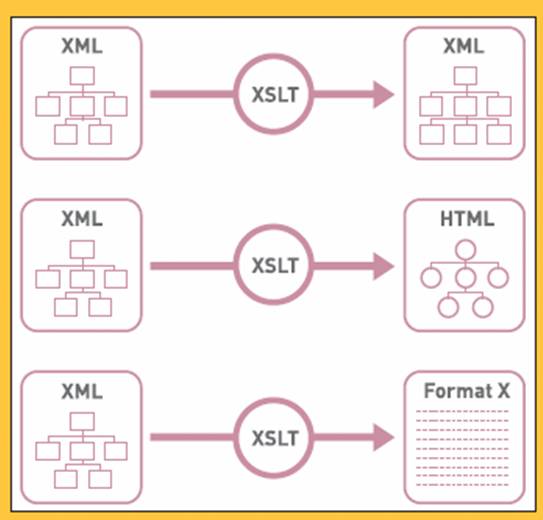
  앞에서도 언급하였지만 XML은 웹상에서 사용될 때에는 주로 컨텐츠를 기술하는 역할을 담당하는데, 현실적으로 컨텐츠의 내용에 따라 구성된 모든 DTD를 지원하는 브라우저를 만든다는 것은 불가능하다. 그래서 XML로 표현된 컨텐츠를 실제 사용자가 볼 수 있는 HTML 등의 포맷으로 변환하는 과정이 필요하게 되는데, 이를 담당하는 것이 바로 XSLT이다.


  웹사이트의 제작에 있어 XSLT는 디자인 템플릿을 기술하는 목적으로 주로 사용되며, 같은 종류의 컨텐츠에 일관된 디자인 템플릿을 적용시킴으로써 사이트 전체의 디자인 일관성 유지를 통한 웹 아이덴티티 확립에 크게 도움을 준다.


또한 XSLT의 가장 큰 특징은 HTML로의 변환 뿐 아니라 다른 구조의 XML이나 XML이 아닌 포맷으로의 변환이 자유롭다는 것인데, 이런 특성으로 말미암아 같은 컨텐츠를 웹사이트(HTML)와 무선인터넷(WML, mHTML) 등 디바이스 플랫폼에 따라 다른 디자인 템플릿을 적용시킴으로써 다양한 플랫폼의 지원이 필요한 웹사이트 제작시 유용하다. 또한, 디자인 템플릿과 컨텐츠가 분리됨으로써 사이트 디자인 업데이트시 XSLT로 작성된 디자인 템플릿만 새롭게 제작하면 되기 때문에 효율을 극대화할 수 있다.


XML/XSLT를 통한 컨텐츠와 디자인 템플릿의 분리는 요즈음 인터넷 업계의 또다른 기술적 트렌드인 CMS(Content Management System)과 긴밀한 관계를 가지고 있다. 웹사이트를 위한 컨텐츠의 생성/저장/수정/배포를 종합적으로 관리하는 CMS들은 기존 제품의 경우 자체적인 템플릿 언어들을 가지고 있었고, 웹사이트를 만드는 사람의 입장에서는 각 CMS의 고유 템플릿 언어를 배우기 위해 많은 시간과 노력을 투자했어야 하는 것은 물론이고, 고유 템플릿 언어들의 한계로 인하여 CMS를 도입한 웹사이트 제작에 어려움을 겪은 것이 사실이다. 그러나 현재 추세로 볼 때 CMS가 컨텐츠를 XML로 관리하고 디자인 템플릿을 위해 XSLT를 사용하는 것이 표준화되고 있고, XSLT가 기존의 어떠한 고유 템플릿 언어보다도 강력한 기능을 제공해 주기 때문에, 이제 웹 디자이너나 개발자들은 표준화된 한가지 템플릿 언어만 습득하면되는것이다.


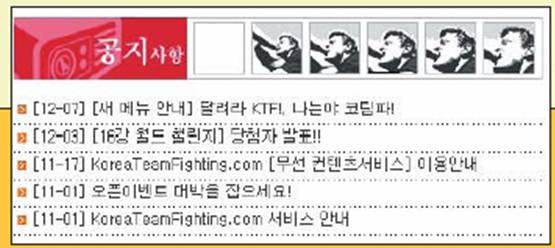
다음은 간단한 XML과 XSLT의 샘플과 그 결과 화면이다.
XML 파일
<?xml version="1.0" encoding="euc-kr"?>
<notice>
<notice_item>
<id>1</id>
<title>[새 메뉴 안내] 달려라 KTF!, 나는야 코팀파!</title>
<date month="12" day="7"/>
</notice_item>
<notice_item>
<id>2</id>
<title>[16강 월드 챌린지] 당첨자 발표!! </title>
<date month="12" day="3"/>
</notice_item>
<notice_item>
<id>3</id>
<title>KoreaTeamFighting.com [무선 컨텐츠서비스] 이용안내 </title>
<date month="11" day="17"/>
</notice_item>
<notice_item>
<id>4</id>
<title>오픈 이벤트 대박을 잡으세요!</title>
<date month="11" day="17"/>
</notice_item>
<notice_item>
<id>5</id>
<title>KoreaTeamFighting.com 서비스 안내</title>
<date month="11" day="01"/>
</notice_item>
</notice>


XSLT 파일
<?xml version="1.0" encoding="euc-kr"?>
<xsl:stylesheetversion="1.0" xmlns:xsl="http://www.w3.org/TR/WD-xsl">
<xsl:template match="/">
<TABLEcellSpacing="0"cellPadding="0" width="400" border="1">
<TBODY>
<TR>
<TD colspan="3" height="48" width="410"><IMG src="/images/notice.gif" /></TD>
</TR>
<xsl:for-each select="//notice_item">
<TR>
<TD width="10"><IMG src="/images/blank.hig"
width="10" height="1" /></TD>
<TDwidth="390"><A href="javascript:
notice_pop('<xsl:value-of select="id"/>','149');">[<xsl:value-of
select="date/@month"/>-<xsl:value-of select="date/@day"/>]
<xsl:value-of select="title"/></A></TD>
<TD width="10"><IMG src="/images/blank.hig" width="10" height="1" /></TD>
</TR>
<TR>
<TD colspan="3"><IMG height="1" alt="" src="/images/main_notice_line.gif" width="409"
border="0" /></TD>
</TR>
</xsl:for-each>
</TBODY>
</TABLE>
</xsl:template>
</xsl:stylesheet>


XML과웹의미래


지금처럼 인터넷이 대중화될 수 있었던 배경에는 HTML과 웹 서버를 중심으로 한 웹의 기반 기술들이 배경지식을 갖추지 못한 초보자들도 쉽게 이해할 수 있을 만큼 학습과 실전에서의 적용이 그다지 어렵지 않았다는 점이 크게 작용을 했다. 누구나 웹 서버 한 대와 인터넷 전용선, 그리고 HTML에 대한 기본적인 지식만 있으면 정보 소비자의 입장에서 정보 공급자의 역할을 수행할 수 있었다. 그러나 그 결과로 걸러지지 않은 정보가 난무한 나머지 웹에서 정보를 찾는다는 것은 쓰레기더미에서 보물을 찾는 것과 비슷하게 되어 버렸다.


현재 무선인터넷과 PDA, 정보가전 등 다양한 디바이스 플랫폼이 다양화됨에 따라 PC 상의 브라우저를 통해 접속하는 기존의 웹 환경 이상의 것을정보소비자들에게 제공해야 하는 필요성이 더욱 가중되고 있다.


XML은 웹 환경의 변화에 발맞추어 기존의 웹 환경을 존중하면서 웹의 근본적인 변화를 시도하려는 노력의 산물이다. 이미 XML 혁명은 인터넷의 백엔드로부터 조용히 시작되어 점차 프론트엔드로 확산되고 있다. 웹 기술이 하루가 다르게 발전하고 있다고는 하지만, 실제로 HTML 4.0이 발표된 1998년 이후 웹사이트 제작에 참여하는 모든 사람들이 영향을 받을만한 기술적인 변화는 크게 없었던 것이 사실이다.


그런 의미에서 XML은 웹 디자이너, 기획자, 개발자에게 모두 커다란 도전이 될 것이며, HTML에 비해 학습에 드는 노력의 양이 상당한 만큼 고급 웹사이트 구축에 있어서의 전문성을 구축하는 중요한 차별화 요소로 작용할 것이다.


국내 시장에서 웹 환경의 XML 적용은 아직 초보적인 수준에 머무르고 있는 것이 사실이다. 2001년 새해에는 XML의 활발한 적용이 국내 웹사이트들의 질을 한단계 높이는 디딤돌이 되기를 기대해 본다.


XML을이용한사이트
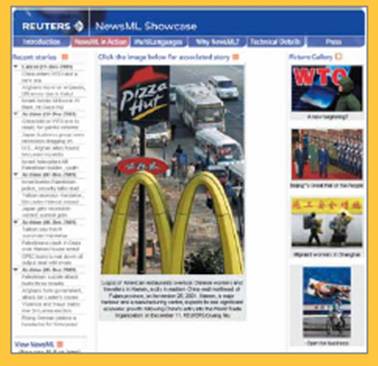


Reuters NewsML Showcase : NewsML


http://newsshowcase.rtrlondon.co.uk/latest/main-0.asp


뉴스의 교환을 위해 만들어진 NewsML의 데모를 보여주는 사이트. 이미 로이터통신은 전세계 수천개의 신문사와 방송사에 공급되는 자사의 뉴스 제공 시스템을 XML에 기반한 표준인 NewsML로 업그레이드하였다. 보여지는 페이지들은 NewsML로 표현된 컨텐츠를 XSLT 템플릿으로 변환한 결과이다.
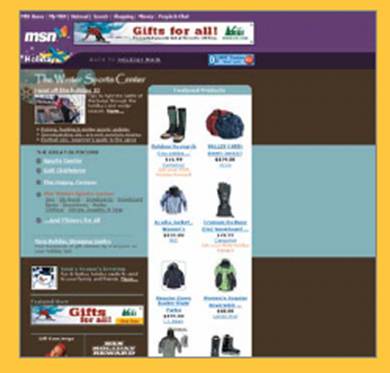


MSN.com: XHTML


www.msn.com


마이크로소프트사의 포털사이트 MSN.com은 2001년 10월부터 XHTML로 서비스를 하고 있으며, XML을 이용하여 Windows XP와 긴밀하게 결합되어 있다.
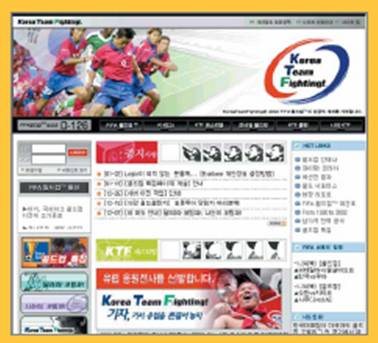


KoreaTeamFighting.com: XSLT


www.koreateamfighting.com


KTF의 월드컵 사이트인 KoreaTeamFighting.com은 웹사이트와 무선 인터넷에 서 동일한 컨텐츠를 서비스하기 위해 내부적으로 XSLT를 템플릿 언어로 사용하고 있다.


웹디자이너들이궁금해하는XML에대한몇가지질문과답


Q XML은 정말 많이 쓰이고 있는가?
A XML은 이미 우리 생활에 깊숙하게 들어와 있지만, 주로 보이지 않는 곳에서 사용되므로 잘 알지 못하고 지나치는 경우가 대부분이다. 웹디자이너의 입장에서 XML을 접할 수 있는 경우는 다음과 같다.
•마이크로소프트 오피스 XP는 엑셀과 엑세스, 아웃룩에서 XML을 직접지원한다.
•현재 우리나라 무선 통신 사업자 중 SK텔레콤의 nTop과 LG텔레콤의 Ez-I는 모두 WAP 기반의 서비스로 WML이라는 XML 기반의 언어를 사용한다.
•플래시 5의 액션스크립트는 XML 데이터를 로딩하고 핸들링할 수 있는 기능을 제공한다.
•일러스트레이터는 버전 8 이후로 XML기반의 벡터 그래픽 포맷인 SVG(Scalable Vector Graphics) 포맷으로의 익스포트를 지원한다.
•거의 모든 B2B 전자상거래 사이트는 XML을 기반으로 하여 여러 기업간에 표준화된 거래 처리를 할 수 있도록 지원하고 있다.


Q XML은 HTML을 대체할 것인가?
A XML은 HTML을 대체하기 위해 만들어진 것은 아니다. 앞에서 설명한 것처럼 XML은 마크업 언어를 정의하기 위해 제공되는 체계이기 때문에 이미 수천가지 이상의 마크업 언어가 XML에 기반하여 정의되어 있고, 앞으로 그 숫자는 더욱 늘어날 것이다. 어떤 브라우저도 이런 많은 수의 XML 기반 마크업 언어에 알맞은 시각적 표현 방식을 찾아 렌더해 줄 수는 없을 것이다.
더 현실적으로 말하면, XML의 중요한 적용 분야 중의 하나는 웹이고, XML은 이미 HTML을 대체하고 있다. HTML 표준을 관장하는 W3C에서 HTML 4.01 이후의 버전을 더 이상 발표하지 않기로 결정하고 그 대신 HTML을 XML의 기반에서 발전시킨 XHTML 1.0을 권장한다고 발표하였다. XHTML은 HTML을 계승하여 앞으로 계속 발전해 나갈 것이다.


Q 왜 또 다른 마크업 언어가 필요한가? HTML을 계속 확장해서 쓸 수 없는가?
A 웹은 정보를 공유하는 수단으로 발명되었으나, 현재 웹의 근간을 이루고 있는 HTML은 정보보다는 정보가 시각적으로 표현되는 레이아웃과 포맷을 구성하는 데 중점을 두고 발전을 해 온 까닭에 현재 웹상의 대부분의 HTML은 컨텐츠와 포맷이 섞여 있어서, 웹의 발전을 오히려 가로막고 있는 장애물이 되고 있다. 또한 HTML의 표준은 지나치게 복잡해진 상태이고, 브라우저 개발업체에서 자신들의 고유한 기능을 새롭게 도입하는 것을 막을 수 없다. XML은 시간이 지남에 따라 발전할 수 있는 기능 자체를 정의하지 않고, 기능을 정의할 수 있는 체계만을 정의함으로써, 인터넷이 발전함에 따라 필연적인 기능의 추가가 표준을 어기지 않고도 가능한 확장성을 가지고 있다.


Q 컨텐츠와 포맷의 분리는 왜 그렇게 중요한가?
A 컨텐츠와 포맷의 분리가 중요한 이유는 다음과 같다.
첫째, 앞으로의 인터넷은 더 이상 PC 환경의 통일된 브라우저 상에서 서비스되지 않을 것이기 때문이다. PDA, 핸드폰, 텔레비전, 기타 정보가전으로 인터넷 서비스의 대상이 되는 디바이스 플랫폼이 확장되면서, 동일한 컨텐츠를 각 디바이스의 특성에 맞도록 포매팅하여 보여주는 것이 점
차중요해질 것이다.
둘째, 컨텐츠와 포맷의 분리는 machine-readability를 향상시킨다. 즉, 사람이 아닌 소프트웨어가 웹 페이지의 내용을 읽어 필요한 처리를 할 수 있게 되므로 컨텐츠의 가치를 향상시킨다. 예를 들어 더 뛰어난 가격 검색엔진이 가능해지는 것이다.
셋째, 웹 개발에 있어 디자이너와 컨텐츠 관리자의 역할을 명확하게 분리하여 각자가 자신의 역할에만 충실할 수 있게 한다. 컨텐츠 관리자가 컨텐츠를 업데이트하다가 HTML을 잘못 건드려 디자인이 '깨진' 경험, 디자이너가 디자인 업데이트를 하다가 컨텐츠를 실수로 수정한 경험은 누구나 한번쯤 겪어보았을 것이다.


컨텐츠와 포맷을 분리함으로써 디자이너와 컨텐츠 관리자는 서로의 영역을 침범하지 않으면서 자신의 전문 분야에 효율적으로 집중할 수 있게 되는것이다.


Q HTML로 작성된 페이지를 XML로 변환하는 것이 가능한가?
A 두가지답이가능하다.
만약 HTML을 XHTML로 변환하는 것에 대한 질문이라면, HTML과 XHTML의 차이에 대한 리스트가 XHTML 스펙에 함께 제공되고, XHTML 문법을 체크해 주는 validation 서비스도 제공되고 있으므로 HTML을 XHTML로 변환하는 것은 그렇게 어려운 일이 아니다. 또한, XHTML은 좀 더 엄격한 문법을 제시하고 있기 때문에 XHTML에 따라 코딩을 하게 되면 HTML을 지원하는 대부분의 브라우저에서 문제 없이 볼 수 있을 뿐 아니라, 더욱 깨끗한 HTML 코드를 사용하게 되는 효과가 있다. W3C 사이트에서 제공되는 HTML Tidy라는 공개 툴을 사용하여 자동 변환도 가능하다.
만약 HTML을 내용을 표현하는, 즉 MathML이나 Chemical Markup Language와 같은 XHTML 이외의 다른 XML로 변환하는 것에 대한 질문이라면, 불가능하지는 않지만 어렵다고 답하고 싶다. HTML 태그들은 ‘의미’에 대한 정보를 전혀 가지고 있지 않기 때문에 내용에 따라 일관된 HTML 형식으로 코딩이 되어 있다면 어렵지만 가능은 할 것이고, HTML 코딩 방식이 제멋대로라면, 내용을 추출해 내기 힘들 것이기 때문이다.
만약 표준화된 형식에 의해 만들어진 HTML이라면 XHTML로 변환 후에 XSLT를 사용하여 다른 XML로 변환하는 방법을 사용할 수 있다.


Q 앞으로 웹 디자이너는 XML을 배워야 하는가?
A XML의 기본적인 성질을 이해하고, 디자인에 관련된 부분에서의 XML 관련 기술을 습득하는 것은 필요하지만 웹 디자이너가 XML의 모든 자세한 부분을 알아야 할 필요는 없다. XML의 개념을 이해하는 것은 그리 어렵지 않다는 점을 유념하라.


Q XML이 웹 디자이너의 작업에 영향을 미칠 부분은 어떤 부분인가?
A 현재 대부분의 웹디자이너들은 컨텐츠를 HTML 파일로 도출하는 방식으로 일하고 있다. XML에 기반한 웹사이트 제작이 정착된다면 웹디자이너는 컨텐츠와 함께 각 컨텐츠 컴포넌트들의 정확한 구조가 표현된 XML DTD와 샘플 XML 파일을 받아서 이 컨텐츠를 표현할 수 있는 템플릿 디자인을 XHTML(혹은 해당 디바이스 플랫폼에 맞는 형태의 결과물)파일과 XSLT 파일로 만들어내야 할 것이다.


XSLT xsl:with-param 용법

<결과>


도서명 가격
괴테의 이탈리아 기행 15000
브리짓존스의 일기 7800
씨 뿌리는 사람의 씨앗 6000
하루키의 여행법 7000
인도방랑 8800


----------------------------------------------------------------------------------------


<?xml:namespace prefix = xsl /><xsl:stylesheet version="1.0" xsl="http://www.w3.org/1999/XSL/Transform">
<xsl:output method="html"></xsl:output>
<xsl:template match="/">


<table border="1">
<tbody><tr>
<td>
<b>도서명</b>
</td>
<td>
<b>가격</b>
</td>
</tr>
<xsl:for-each select="//도서">
<tr>
<td>
<xsl:value-of select="도서명"></xsl:value-of>
</td>
<td>
<xsl:call-template name="value">
<xsl:with-param select="가격" name="varPrice"></xsl:with-param>
</xsl:call-template>
</td>
</tr>
</xsl:for-each>
</tbody></table>


</xsl:template>
<xsl:template name="value">
<xsl:param name="varPrice"></xsl:param>
<xsl:value-of select="$varPrice"></xsl:value-of>
</xsl:template>
</xsl:stylesheet>


Spring을 사용한 원격(Remoting)및 웹서비스

Spring을 사용한 원격(Remoting)및 웹서비스


17.1. 소개


원격 지원을 위한 Spring통합 클래스는 다양한 기술을 사용한다. 원격 지원은 당신의 (Spring) POJO에 의해 구현되는 원격-가능 서비스의 개발을 쉽게 한다. 현재 Spring은 4가지 원격 기술을 지원한다.


  • 원격 메소드 호출 (RMI). RmiProxyFactoryBeanRmiServiceExporter의 사용을 통해 Spring은 전통적인 RMI(java.rmi.Remote 인터페이스와 java.rmi.RemoteException을 가지는)와 RMI 호출자(어떠한 자바 인터페이스를 가진)를 통한 투명한 원격 모두 지원합니다.


  • Spring의 HTTP 호출자. Spring은 어떤 자바 인터페이스(RMI 호출자와 같은)를 지원하는 HTTP를 통한 자바 직렬화를 허용하는 특별한 원격 전략을 제공한다. 관련 지원 클래스는 HttpInvokerProxyFactoryBeanHttpInvokerServiceExporter이다.


  • Hessian. HessianProxyFactoryBeanHessianServiceExporter를 사용하여 Caucho에 의해 제공되는 가벼운 바이너리 HTTP기반 프로토콜을 사용하는 당신의 서비스를 투명하게 드러낼수 있다.


  • Burlap. Burlap은 Hessian을 위한 Caucho의 XML기반의 대안이다. Spring은 BurlapProxyFactoryBeanBurlapServiceExporter 같은 지원 클래스를 제공한다.


  • JAX RPC. Spring은 JAX-RPC를 통한 웹서비스를 위한 원격 지원을 제공한다.


  • JMS (TODO).


Spring의 원격 기능에 대해 언급하는 동안 우리는 다음의 도메인 모델과 관련 서비스를 사용할것이다.

// Account domain object
public class Account implements Serializable{
private String name;

public String getName();
public void setName(String name) {
this.name = name;
}
}

// Account service
public interface AccountService {

public void insertAccount(Account acc);

public List getAccounts(String name);
}

// Remote Account service
public interface RemoteAccountService extends Remote {

public void insertAccount(Account acc) throws RemoteException;

public List getAccounts(String name) throws RemoteException;
}

// ... and corresponding implement doing nothing at the moment
public class AccountServiceImpl implements AccountService {

public void insertAccount(Account acc) {
// do something
}

public List getAccounts(String name) {
// do something
}
}


우리는 RMI를 사용하여 원격 클라이언트에 서비스를 드러내길 시작하고 RMI를 사용한 장애에 대해 조금 이야기할것이다. 우리는 Hessian을 위한 예제를 보여줄 것이다.


17.2. RMI를 사용한 서비스 드러내기


RMI를 위한 Spring의 지원을 사용하여, 당신은 RMI내부구조를 통해 당신의 서비스를 투명하게 드러낼수 있다. 이 셋업 후 당신은 보안 컨텍스트 위임이나 원격 트랜잭션 위임을 위한 표준적인 지원이 없다는 사실을 제외하고 기본적으로 remote EJB와 유사한 설정을 가진다. Spring은 RMI호출자를 사용할때 추가적인 호출 컨텍스트와 같은 것을 위한 고리(hooks)를 제공한다. 그래서 당신은 예를 들어 보안 프레임워크나 사용자정의 보안 증명에 붙일수 있다.


17.2.1. RmiServiceExporter를 사용하여 서비스 내보내기


RmiServiceExporter를 사용하여, 우리는 RMI객체처럼 AccountService객체의 인터페이스를 드러낼수 있다. 인터페이스는 RmiProxyFactoryBean을 사용하거나 전통적인 RMI서비스의 경우 일반적인 RMI를 통해 접근될수 있다. RmiServiceExporter는 RMI호출자를 통해 RMI가 아닌 서비스의 발생을 명시적으로 지원한다.


우리는 먼저 Spring BeanFactory내 우리의 서비스를 셋업한다.

<bean id="accountService" class="example.AccountServiceImpl">
<!-- any additional properties, maybe a DAO? -->
</bean>


그리고 나서 우리는 RmiServiceExporter를 사용하여 우리의 서비스를 드러낼것이다.

<bean class="org.springframework.remoting.rmi.RmiServiceExporter">
<!-- does not necessarily have to be the same name as the bean to be exported -->
<property name="serviceName"><value>AccountService</value></property>
<property name="service"><ref bean="accountService"/></property>
<property name="serviceInterface"><value>example.AccountService</value></property>
<!-- defaults to 1099 -->
<property name="registryPort"><value>1199</value></property>
</bean>

당신이 볼수 있는 것처럼, 우리는 RMI등록(registry)을 위한 포트를 오버라이딩한다. 종종, 당신의 애플리케이션 서버는 RMI등록을 유지하고 그것을 방해하지 않는것이 현명하다. 게다가 서비스 이름은 서비스를 바인드 하기 위해 사용된다. 서비스는 rmi://HOST:1199/AccountService에 비인드될것이고 우리는 클라이언트측에서 서비스로 링크하기 위해 이 URL을 사용할것이다.


노트 : 우리는 하나의 프라퍼티를 남겨두었다. 이를테면 servicePort이고 디폴트로에 의해 0이된다. 이것은 서비스와 통신하기 위해 사용될 익명 포트를 의미한다. 당신은 다른 포트를 명시할수 있다.


17.2.2. 클라이언트에서 서비스 링크하기


우리의 클라이언트는 계좌(accounts)를 관리하기 위한 AccountService을 사용하는 간단한 객체이다.

public class SimpleObject {
private AccountService accountService;
public void setAccountService(AccountService accountService) {
this.accountService = accountService;
}
}


클라이언트에서 서비스에 링크하기 위해, 우리는 간단한 객체와 서비스 링크 설정을 포함하는 분리된 bean factory를 생성할 것이다.

<bean class="example.SimpleObject">
<property name="accountService"><ref bean="accountService"/></property>
</bean>

<bean id="accountService" class="org.springframework.remoting.rmi.RmiProxyFactoryBean">
<property name="serviceUrl"><value>rmi://HOST:1199/AccountService</value></property>
<property name="serviceInterface"><value>example.AccountService</value></property>
</bean>

그것은 우리가 클라이언트에서 원격 계좌(account)서비스를 지원하기 위해 해야 할 필요가 있는 모든것이다. Spring은 호출자를 투명하게 생성하고 RmiServiceExporter를 통해 계좌 서비스를 원격적으로 가능하게 한다. 클라이언트에서 우리는 RmiProxyFactoryBean를 사용하여 이것을 링크한다.


17.3. HTTP를 통해 서비스를 원격으로 호출하기 위한 Hessian 이나 Burlap을 사용하기.


Hessian은 바이너리 HTTP-기반 원격 프로토콜을 제공한다. 이것은 Caucho에 의해 생성되었고 Hessian자체에 대한 좀더 상세한 정보는 http://www.caucho.com에서 찾을수 있다.


17.3.1. Hessian을 위해 DispatcherServlet을 묶기.


Hessian은 HTTP를 통해 통신하고 사용자정의 서블릿을 사용해서도 그렇게 한다. Spring의 DispatcherServlet 원리를 사용하여, 당신의 서비스를 드러내는 서블릿을 쉽게 묶을수 있다. 먼저 우리는 애플리케이션내 새로운 서블릿을 생성해야만 한다. (이것은 web.xml으로 부터 인용한다.)

<servlet>
<servlet-name>remoting</servlet-name>
<servlet-class>org.springframework.web.servlet.DispatcherServlet</servlet-class>
<load-on-startup>1</load-on-startup>
</servlet>

<servlet-mapping>
<servlet-name>remoting</servlet-name>
<url-pattern>/remoting/*</url-pattern>
</servlet-mapping>


당신은 아마도 Spring의 DispatcherServlet 원리에 익숙하고 만약 그렇다면 당신은 WEB-INF 디렉토리내 (당신의 서블릿 이름 뒤) remoting-servlet.xml라는 이름의 애플리케이션 컨텍스트를 생성할것이다. 애플리케이션 컨텍스트는 다음 부분에서 사용될것이다.


17.3.2. HessianServiceExporter를 사용하여 bean을 드러내기


remoting-servlet.xml 라고 불리는 새롭게 생성된 애플리케이션 컨텍스트내에서 우리는 당신의 서비스를 내보내는 HessianServiceExporter를 생성할것이다.

<bean id="accountService" class="example.AccountServiceImpl">
<!-- any additional properties, maybe a DAO? -->
</bean>

<bean name="/AccountService" class="org.springframework.remoting.caucho.HessianServiceExporter">
<property name="service"><ref bean="accountService"/></property>
<property name="serviceInterface">
<value>example.AccountService</value>
</property>
</bean>

지금 우리는 클라이언트에서 서비스를 링크할 준비가 되어있다. 명시된 핸들러 맵핑은 없고 서비스를 향한 요청 URL을 맵핑한다. 그래서 BeanNameUrlHandlerMapping은 사용될것이다. 나아가 서비스는 bean이름(http://HOST:8080/remoting/AccountService)을 통해 표시되는 URL에 내보내어질것이다.


17.3.3. 클라이언트의 서비스로 링크하기


HessianProxyFactoryBean을 사용하여 우리는 클라이언트에서 서비스로 링크할수 있다. 같은 원리는 RMI예제처럼 적용한다. 우리는 분리된 bean factory나 애플리케이션 컨텍스트를 생성하고 SimpleObject가 계좌를 관리하기 위해 AccountService를 사용하는 다음 bean을 따른다.

<bean class="example.SimpleObject">
<property name="accountService"><ref bean="accountService"/></property>
</bean>

<bean id="accountService" class="org.springframework.remoting.caucho.HessianProxyFactoryBean">
<property name="serviceUrl"><value>http://remotehost:8080/AccountService</value></property>
<property name="ServiceInterface"><value>example.AccountService</value></property>
</bean>

That's all there is to it.


17.3.4. Burlap 사용하기


우리는 Hessian의 XML기반의 대응물인 Burlap을 여기서 상세하게 언급하지 않을것이다. Hessian처럼 정확하게 같은 방법으로 설정되고 셋업된 후 변형물은 위에서 설명된다. Hessian 이라는 단어를 Burlap으로 교체하고 당신은 모든것을 셋팅한다.


17.3.5. Hessian 이나 Burlap을 통해 드러나는 서비스를 위한 HTTP 기본 인증 적용하기


Hessian 과 Burlap 장점중 하나는 두가지 프로토콜이 모두 HTTP-기반이기 때문에 우리가 HTTP 기본 인증을 쉽게 적용할수 있다는 것이다. 당신의 일반적인 HTTP서버의 보안 기법은 web.xml 보안 기능을 사용하여 쉽게 적용될수 있다. 대개 당신은 여기서 사용자별 보안 증명을 사용하지 않지만 공유된 증명은 Hessian/BurlapProxyFactoryBean 레벨(JDBC 데이터소스와 유사한)에서 정의된다.


<bean class="org.springframework.web.servlet.handler.BeanNameUrlHandlerMapping">
<property name="interceptors">
<list>
<ref bean="authorizationInterceptor"/>
</list>
</property>
</bean>

<bean id="authorizationInterceptor"
class="org.springframework.web.servlet.handler.UserRoleAuthorizationInterceptor">
<property name="authorizedRoles">
<list>
<value>administrator</value>
<value>operator</value>
</list>
</property>
</bean>


이것은 우리가 BeanNameUrlHandlerMapping을 명시적으로 언급하고 오직 관리자만을 허용하는 인터셉터를 셋팅하며 이 애플리케이션 컨텍스트내에서 언급된 bean을 호출하는 작업을 수행하는 예제이다.


노트 : 물론, 이 예제는 보안 내부구조의 유연한 종류를 보여주지 않는다. 보안이 관련된 만큼 좀더 많은 옵션을 위해서 Spring을 위한 Acegi 보안 시스템을 보라. 그것은 http://acegisecurity.sourceforge.net에서 찾을수 있다.


17.4. HTTP호출자를 사용하여 서비스를 드러내기


그들 자체의 얼마 안되는 직렬화 기법을 사용하는 가벼운 프로토콜인 Burlap 과 Hessian이 상반돤것처럼 Spring HTTP호출자는 HTTP를 통해 서비스를 드러내기 위한 표준적인 자바 직렬화 기법을 사용한다. 이것은 당신의 인자와 반환 타입이 Hessian 과 Burlap이 사용하는 직렬화 기법을 사용하여 직렬화될수 없는 복합(complex)타입이라면 커다란 장점을 가진다. (원격 기술을 선택할때 좀더 많은 숙고사항을 위해서 다음 부분을 참조하라.)


Spring은 HTTP호출을 수행하거나 Commons HttpClient를 위해 J2SE에 의해 제공되는 표준적인 기능을 사용한다. 만약 당신이 좀더 향상되었거나 사용하기 쉬운 기능이 필요하다면 후자를 사용하라. 좀더 많은 정보를 위해서는 jakarta.apache.org/commons/httpclient을 참조하라.


17.4.1. 서비스 객체를 드러내기


Hessian 이나 Burlap을 사용하는 방법과 매우 유사한 서비스 객체를 위한 HTTP 호출자 내부구조를 셋업하라. Hessian지원이 HessianServiceExporter를 제공하는 것처럼 Spring Http호출자 지원은 org.springframework.remoting.httpinvoker.HttpInvokerServiceExporter라고 불리는 것을 제공한다. (위에서 언급된) AccountService을 드러내기 위해 다음 설정이 대체될 필요가 있다.

    <bean name="/AccountService" class="org.sprfr.remoting.httpinvoker.HttpInvokerServiceExporter">
<property name="service"><ref bean="accountService"/></property>
<property name="serviceInterface">
<value>example.AccountService</value>
</property>
</bean>


17.4.2. 클라이언트에서 서비스 링크하기


다시 클라이언트로부터 서비스를 링크하는것은 Hessian 이나 Burlap을 사용할때 이것을 하는 방법과 매우 유사하다. 프록시를 사용하여 Spring은 내보내어진 서비스를 위한 URL을 위해 당신의 호출을 HTTP POST요청으로 번역할수 있을것이다.

 
<bean id="httpInvokerProxy" class="org.sprfr.remoting.httpinvoker.HttpInvokerProxyFactoryBean">
<property name="serviceUrl">
<value>http://remotehost:8080/AccountService</value>
</property>
<property name="serviceInterface">
<value>example.AccountService</value>
</property>
</bean>


전에 언급된것처럼, 당신은 사용하고자 하는 HTTP클라이언트를 선택할수 있다. 디폴트에 의하면 HttpInvokerProxy가 J2SE HTTP기능을 사용한다. 하지만 당신은 httpInvokerRequestExecutor 프라퍼티를 셋팅하여 Commons HttpClient를 사용할수 있다.

<property name="httpInvokerRequestExecutor">
<bean class="org.springframework.remoting.httpinvoker.CommonsHttpInvokerRequestExecutor"/>
</property>


17.5. 웹 서비스


Spring은 다음을 위한 지원을 가진다.


  • JAX-RPC를 사용하여 서비스를 드러내기
  • 웹 서비스에 접근하기


위의 지원 목록 다음으로, 당신은 XFire xfire.codehaus.org를 사용하여 웹 서비스를 드러낼수 있다. XFire는 Codehaus에서 현재 개발중인 가벼운 SOAP라이브러리이다.


17.5.1. JAX-RPC를 사용하여 서비스를 드러내기


Spring은 JAX-RPC 서블릿 endpoint구현물(ServletEndpointSupport)을 위한 편리한 base클래스이다. 우리의 AccountService를 드러내기 위해 우리는 Spring의 ServletEndpointSupport클래스를 확장하고 여기서 언제나 비지니스 레이어로 호출을 위임하는 비지니스 로직을 구현한다.

/**
* JAX-RPC compliant RemoteAccountService implementation that simply delegates
* to the AccountService implementation in the root web application context.
*
* This wrapper class is necessary because JAX-RPC requires working with
* RMI interfaces. If an existing service needs to be exported, a wrapper that
* extends ServletEndpointSupport for simple application context access is
* the simplest JAX-RPC compliant way.
*
* This is the class registered with the server-side JAX-RPC implementation.
* In the case of Axis, this happens in "server-config.wsdd" respectively via
* deployment calls. The Web Service tool manages the life-cycle of instances
* of this class: A Spring application context can just be accessed here.
*/
public class AccountServiceEndpoint extends ServletEndpointSupport implements RemoteAccountService {

private AccountService biz;

protected void onInit() {
this.biz = (AccountService) getWebApplicationContext().getBean("accountService");
}

public void insertAccount(Account acc) throws RemoteException {
biz.insertAccount(acc);
}

public Account[] getAccounts(String name) throws RemoteException {
return biz.getAccounts(name);
}

}

우리의 AccountServletEndpoint는 Spring의 기능에 접근하기 위해 허용하는 Spring컨텍스트처럼 같은 웹 애플리케이션내에서 수행할 필요가 있다. Axis의 경우, AxisServlet정의를 web.xml로 복사하고 "server-config.wsdd" 내 endpoint를 셋업한다.(또는 배치툴을 사용한다.) Axis를 사용한 웹 서비스처럼 드러나는 OrderService가 있는 샘플 애플리케이션 JPetStore를 보라.


17.5.2. 웹 서비스에 접근하기


Spring은 웹 서비스 프록시인 LocalJaxRpcServiceFactoryBeanJaxRpcPortProxyFactoryBean을 생성하기 위한 두가지 factory bean을 가진다. 전자는 JAX-RPC서비스 클래스만을 반환할수 있다. 후자는 우리의 비지니스 서비스 인터페이스를 구현하는 프록시를 반환할수 있는 완전한 버전이다. 이 예제에서 우리는 이전 단락내 나오는 AccountService Endpoint를 위한 프록시를 생성하기 위해 나중에 사용된다. 당신은 Spring이 조금의 코딩을 요구하는 웹 서비스를 위한 대단한 지원을 가진다는 것을 볼것이다. 대부분의 마법은 대개 Spring설정 파일내에서 이루어진다.

    <bean id="accountWebService" class="org.springframework.remoting.jaxrpc.JaxRpcPortProxyFactoryBean">
<property name="serviceInterface">
<value>example.RemoteAccountService</value>
</property>
<property name="wsdlDocumentUrl">
<value>http://localhost:8080/account/services/accountService?WSDL</value>
</property>
<property name="namespaceUri">
<value>http://localhost:8080/account/services/accountService</value>
</property>
<property name="serviceName">
<value>AccountService</value>
</property>
<property name="portName">
<value>AccountPort</value>
</property>
</bean>

serviceInterface는 클라이언트가 사용할 원격 비지니스 인터페이스이다. wsdlDocumentUrl은 WSDL파일을 위한 URL이다. Spring은 JAX-RPC서비스를 생성하기 위해 시작시 이것이 필요하다. namespaceUri는 .wsdl파일내 targetNamespace에 대응한다. serviceName은 .wsdl파일내 서비스 이름에 대응한다. portName은 .wsdl파일내 포트명에 대응한다.


웹 서비스에 접근하는 것은 우리가 RemoteAccountService인터페이스처럼 이것을 드러내는 bean factory를 가지는것처럼 매우 쉽다. 우리는 Spring내 이것을 묶을수 있다.

    <bean id="client" class="example.AccountClientImpl">
...
<property name="service">
<ref bean="accountWebService"/>
</property>
</bean>

그리고 클라이언트 코드로 부터 우리는 이것이 RemoteException을 던지는것을 제외하고 일반 클래스인것처럼 웹 서비스에 접근할수 있다.

public class AccountClientImpl {

private RemoteAccountService service;

public void setService(RemoteAccountService service) {
this.service = service;
}

public void foo() {
try {
service.insertAccount(...);
} catch (RemoteException e) {
// ouch
...
}
}

}


우리는 Spring이 관련된 체크되지 않은 RemoteAccessException으로의 자동변환을 지원하기 때문에 체크된 RemoteException을 제거할수 있다. 이것은 우리가 비-RMI인터페이스 또한 제공하는것을 요구한다. 우리의 설정은 다음과 같다.

    <bean id="accountWebService" class="org.springframework.remoting.jaxrpc.JaxRpcPortProxyFactoryBean">
<property name="serviceInterface">
<value>example.AccountService</value>
</property>
<property name="portInterface">
<value>example.RemoteAccountService</value>
</property>
...
</bean>

serviceInterface는 비-RMI 인터페이스를 위해 변경된다. 우리의 RMI 인터페이스는 portInterface 프라퍼티를 사용하여 정의된다. 우리의 클라이언트 코드는 java.rmi.RemoteException을 피할수 있다.

public class AccountClientImpl {

private AccountService service;

public void setService(AccountService service) {
this.service = service;
}

public void foo() {
service.insertAccount(...);
}

}


17.5.3. Register Bean 맵핑


Account와 같은 정보를 넘어 복합 객체를 이동시키기 위해 우리는 클라이언트 측에서 bean맵핑을 등록해야만 한다.


[Note]Note

서버측에서 Axis를 사용하여 등록된 bean맵핑은 server-config.wsdd에서 언제나 수행된다.


우리는 클라이언트 측에서 bean맵핑을 등록하기 위해 Axis를 사용할것이다. 이것을 하기 위해 우리는 Spring Bean factory의 하위클래스를 만들 필요가 있고 프로그램에 따라 bean맵핑을 등록한다.

public class AxisPortProxyFactoryBean extends JaxRpcPortProxyFactoryBean {

protected void postProcessJaxRpcService(Service service) {
TypeMappingRegistry registry = service.getTypeMappingRegistry();
TypeMapping mapping = registry.createTypeMapping();
registerBeanMapping(mapping, Account.class, "Account");
registry.register("http://schemas.xmlsoap.org/soap/encoding/", mapping);
}

protected void registerBeanMapping(TypeMapping mapping, Class type, String name) {
QName qName = new QName("http://localhost:8080/account/services/accountService", name);
mapping.register(type, qName,
new BeanSerializerFactory(type, qName),
new BeanDeserializerFactory(type, qName));
}

}


17.5.4. 자체적인 핸들러 등록하기


이 장에서 우리는 SOAP메시지를 정보를 통해 보내기 전에 코드를 사용자정의 할수 있는 웹 서비스 프록시를 위한 javax.rpc.xml.handler.Handler를 등록할 것이다. javax.rpc.xml.handler.Handler는 콜백 인터페이스이다. jaxrpc.jar내 제공되는 편리한 base클래스인 javax.rpc.xml.handler.GenericHandler가 있다.

public class AccountHandler extends GenericHandler {

public QName[] getHeaders() {
return null;
}

public boolean handleRequest(MessageContext context) {
SOAPMessageContext smc = (SOAPMessageContext) context;
SOAPMessage msg = smc.getMessage();

try {
SOAPEnvelope envelope = msg.getSOAPPart().getEnvelope();
SOAPHeader header = envelope.getHeader();
...

} catch (SOAPException e) {
throw new JAXRPCException(e);
}

return true;
}

}

우리의 AccountHandler를 JAX-RPC 서비스에 등록하는 것이 필요하다. 그래서 메시지가 정보를 통해 전달되기 전에 handleRequest을 호출할것이다. Spring은 이 시점에 핸들러를 등록하기 위한 선언적인 지원을 가지지 않는다. 그래서 우리는 프로그램마다 다른 접근법을 사용해야만 한다. 어쨌든 Spring은 우리가 이 bean factory를 확장하고 postProcessJaxRpcService 메소드를 오버라이드 할수 있는 것처럼 이것을 쉽게 만든다.

public class AccountHandlerJaxRpcPortProxyFactoryBean extends JaxRpcPortProxyFactoryBean {

protected void postProcessJaxRpcService(Service service) {
QName port = new QName(this.getNamespaceUri(), this.getPortName());
List list = service.getHandlerRegistry().getHandlerChain(port);
list.add(new HandlerInfo(AccountHandler.class, null, null));

logger.info("Registered JAX-RPC Handler [" + AccountHandler.class.getName() + "] on port " + port);
}

}

그리고 마지막으로 우리는 factory bean을 사용하기 위해 Spring설정을 변경하는 것을 기억해야만 한다.

    <bean id="accountWebService" class="example.AccountHandlerJaxRpcPortProxyFactoryBean">
...
</bean>


17.5.5. XFire를 사용하여 웹 서비스를 드러내기


XFire는 Codehaus에서 호스팅되는 가벼운 SOAP라이브러리이다. 현 시점(2005년 3월)에, XFire는 여전히 개발중이다. 비록 Spring지원이 안정적이라고 하더라도 대부분의 기능은 나중에 추가될것이다. XFire를 드러내는 것은 당신이 WebApplicationContext에 추가할 RemoteExporter-스타일의 bean으로 조합된 XFire를 가진 XFire 컨텍스트를 사용하는 것이다.


당신이 서비스를 드러내는 것을 허용하는 모든 메소드처럼 당신은 드러낼 서비스를 포함하는 관련된 WebApplicationContext를 가진 DispatcherServlet을 생성해야 한다.

<servlet>
<servlet-name>xfire</servlet-name>
<servlet-class>
org.springframework.web.servlet.DispatcherServlet
</servlet-class>
</servlet>


당신은 XFire설정을 링크해야만 한다. 이것은 ContextLoaderListener(또는 서블릿)가 가지는 contextConfigLocations 컨텍스트 파라미터에 컨텍스트 파일을 추가하는것이다. 설정 파일은 XFire jar파일내 위치하고 물론 애플리케이션의 클래스패스에 위치할수도 있다.

<context-param>
<param-name>contextConfigLocation</param-name>
<param-value>
classpath:org/codehaus/xfire/spring/xfire.xml
</param-value>
</context-param>

<listener>
<listener-class>
org.springframework.web.context.ContextLoaderListener
</listener-class>
</listener>


당신이 서블릿 맵핑(위에서 선언된 XFire서블릿을 위한 /* 맵핑)을 추가한 후에 당신은 오직 XFire를 사용하는 서비스를 드러내기 위한 추가적인 bean을 추가해야만 한다. 예를 들어 당신은 xfire-servlet.xml을 다음에 추가하라.

<beans>
<bean name="/Echo" class="org.codehaus.xfire.spring.XFireExporter">
<property name="service">
<ref bean="echo"/>
</property>
<property name="serviceInterface">
<value>org.codehaus.xfire.spring.Echo</value>
</property>
<property name="serviceBuilder">
<ref bean="xfire.serviceBuilder"/>
</property>
<!-- the XFire bean is wired up in the xfire.xml file you've linked in earlier
<property name="xfire">
<ref bean="xfire"/>
</property>
</bean>

<bean id="echo" class="org.codehaus.xfire.spring.EchoImpl"/>
</beans>


XFire는 나머지를 다룬다. 이것은 당신의 서비스 인터페이스를 분석하고 이것으로 부터 WSDL을 생성한다. 이 문서의 일부는 XFire사이트로부터 가져왔다. XFire와 Spring통합에 대한 좀더 상세한 정보는 docs.codehaus.org/display/XFIRE/Spring를 보라.


17.6. 자동-탐지(Auto-detection)는 원격 인터페이스를 위해 구현되지 않는다.


구현된 인터페이스의 자동-탐지가 원격 인터페이스에는 발생하지 않는 가장 중요한 이유는 원격 호출자를 위해 너무 많은 문이 열리는 것을 피하는 것이다. 대상 객체는 호출자에게 드러내는 것을 원하지 않는 InitializingBean 이나 DisposableBean처럼 내부 콜백 인터페이스를 구현해야만 한다.


대상에 의해 구현된 모든 인터페이스를 가진 프록시를 제공하는 것은 로컬의 경우 언제나 문제가 되지 않는다. 하지만 원격 서비스를 내보낼때 당신은 원격 사용의 경향이 있는 특정 작업을 가진 특정 서비스 인터페이스를 보여야만 한다. 내부 콜백 인터페이스외에도 대상은 원격 노출의 경향이 있는 것중 하나를 가진 다중 비지니스 인터페이스를 구현해야만 한다. 이러한 이유로 우리는 명시되는 서비스 인터페이스를 요구한다.


이것은 설정의 편리함과 내부 메소드의 뜻하지 않는 노출의 위험사이의 거래이다. 서비스 인터페이스를 명시하는 것은 많은 노력이 필요하지 않고 당신을 특정 메소드의 제어된 노출에 관련된 안전적인 쪽에 두게된다.


17.7. 기술을 선택할때 고려사항.


여기에 표시된 각각 그리고 모든 기술은 결점을 가진다. 당신이 기술을 선택할때 당신이 드러내는 서비스와 당신이 정보를 통해 보낼 객체중 필요한 것을 주의깊게 검토해야만 한다.


RMI를 사용할때, 당신이 RMI 소통을 관통(tunneling)하지 않는 한 HTTP프로토콜을 통해 객체에 접근하는 것은 불가능하다. RMI는 정보를 통해 직렬화가 필요한 복합 데이터 모델을 사용할때 중요한 완전한 객체 직렬화를 지원하는 상당히 무거운 프로토콜이다. 어쨌든 RMI-JRMP는 자바 클라이언트에 묶인다. 이것은 자바-대-자바 원격 솔루션이다.


Spring의 HTTP호출자는 만약 당신이 HTTP-기반 원격이 필요하지만 자바 직렬화에 의존한다면 좋은 선택이다. 이것은 수송기처럼 HTTP를 사용하는 RMI호출자를 가진 기본 내부구조를 공유한다. HTTP호출자는 자바-대-자바 원격에 제한을 가지지 않을뿐 아니라 클라이언트측과 서버측 모두 제한을 가하지 않는다. (후자는 비-RMI인터페이스를 위해 Spring의 RMI호출자에 적용한다.)


Hessian 그리고/또는 Burlap은 명시적으로 비-자바 클라이언트를 허용하기 때문에 이종 환경내에서 작동할때 명백한 값을 제공한다. 어쨌든 비-자바 지원은 여전히 제한된다. 알려진 문제는 늦게 초기화하는 collection으로 조합된 Hibernate객체의 직렬화를 포함한다. 만약 당신이 그러한 데이타 모델을 가진다면 Hessian대신에 RMI나 HTTP호출자를 사용하는 것을 검토하라.


JMS는 서비스의 클러스터(clusters)를 제공하기 위해 유용할수 있고 로드 밸런싱, 발견(discovery) 그리고 자동 대체(failover)를 다루기 위해 JMS 브로커(broker)를 허용한다. 디폴트에 의해 자바 직렬화는 JMS원격을 사용하지만 JMS제공자가 서버가 다른 기술로 구현되는것을 허용하는 XStream과 같은 포맷팅을 묶기 위한 다른 기법을 사용할수 있을때 사용된다.


EJB는 표준적인 권한(role)-기반 인증과 인증, 그리고 원격 트랜잭션 위임을 지원하는 면에서 RMI를 능가하는 장점을 가진다. 이것은 비록 핵심 Spring에 의해 제공되지는 않지만 보안 컨텍스트 위임을 지원하는 RMI호출자나 HTTP호출자를 얻는것은 가능하다. 써드 파티나 사용자정의 솔루션내 플러그인하기 위한 선호하는 고리(hooks)가 있다. 


Declaring Complext Types for WSDL

NuSOAP and WSDL Sep 16 2003 | PHP | Email

In a previous entry I wrote about passing and returning structured data using NuSOAP. While that approach worked when using a client written in the same version of NuSOAP, it didn’t work for more stringest clients which need well formed WSDL to create proxies for methods and structures.

After some more digging I discovered a couple of things:

I was using version 0.6.4 of NuSOAP which I found via Google. That’s quite an old version and frankly doesn’t support WSDL well.
After more searching, I found a more current version of NuSOAP on SourceForge.
There don’t seem to be any official releases (yet), so simply download the latest version from the CVS repository.
I used version 1.59 of nusoap.php and it worked for me without any problems.
So, make sure you use the latest version of NuSOAP from SourceForge in your application.

Note: The example this document links to has been updated 10/30/2003 to correct problems on PHP installation that emit warnings about unquoted string constants.

Using WSDL
Due to PHP’s loose typing, you have to epxlictly specify which types are being used by your functions. I believe you can do this with an external WSDL file. I describe the functional approach for registering the types. The following begins the WSDL configuration for a NuSOAP server object:

require_once('nusoap.php');

$NAMESPACE = 'http://books.org/Books';

$server = new soap_server;
$server->configureWSDL('Books', $NAMESPACE);
$server->wsdl->schemaTargetNamespace = $NAMESPACE;
Declaring Complext Types for WSDL
You use the addComplexType() method to register structures and arrays. The following code registers a structure Chapter which contains two members (a string title and an int page), an array of Chapter structures and a structure Book which has several members, including a chapter array.

$server->wsdl->addComplexType(
'Chapter',
'complexType',
'struct',
'all',
'',
array(
'title' => array('name'=>'title','type'=>'xsd:string'),
'page' => array('name'=>'page','type'=>'xsd:int')
)
);

$server->wsdl->addComplexType(
'ChapterArray',
'complexType',
'array',
'',
'SOAP-ENC:Array',
array(),
array(
array('ref'=>'SOAP-ENC:arrayType','wsdl:arrayType'=>'tns:Chapter[]')
),
'tns:Chapter'
);

$server->wsdl->addComplexType(
'Book',
'complexType',
'struct',
'all',
'',
array(
'author' => array('name'=>'author','type'=>'xsd:string'),
'title' => array('name'=>'title','type'=>'xsd:string'),
'numpages' => array('name'=>'numpages','type'=>'xsd:int'),
'toc' => array('name'=>'toc','type'=>'tns:ChapterArray')
)
);
Registering Functions for WSDL
When you register functions with the NuSOAP server, you need to specify the incoming parameters/types and the return type. The following registers a function getBook that takes a string parameter title and returns a Book structure.

$server->register(
'getBook',
array('title'=>'xsd:string'),
array('return'=>'tns:Book'),
$NAMESPACE);
Accessing the WSDL
Once your WSDL specification is complete, you can examine it by passing the wsdl parameter to your PHP script. The script will return the generated WSDL which you can use in your tool to generate proxy classes, etc. Here is the WSDL for this example: http://www.nonplus.net/geek/samples/books.php?wsdl.

Implementing Functions
Using the WSDL specification, you can return SOAP structures as regular PHP associative arrays. When the server handles a SOAP request, it serializes and unserializes the PHP arrays using the WSDL description. The following function returns a book with two chapters (note that it’s blissfully unaware of SOAP):

function getBook($title) {
// Create TOC
$toc = array();
$toc[] = array('title' => 'Chapter One', 'page' => 1);
$toc[] = array('title' => 'Chapter Two', 'page' => 30);

// Create book
$book = array(
'author' => "Jack London",
'title' => $title,
'numpages' => 42,
'toc' => $toc);

return $book;
}
Tying it All Together
The example books.php implements a SOAP server using the structures described above. It registers two methods getBook(title) and getBooks(author), the latter returns an array of Books. Make sure that you have a current version of NuSOAP installed when using the sample script.